
The Grand Exchange
Tired of that sofa? Take it to the Grand Exchange, the inn’s second-hand market. Sell furni to the walrus dealer for Krill on the spot, or put it up at a market stall at your own price and let another penguin buy it. Second-hand furni is always cheaper than in the Shop, so the Grand Exchange is also the place to hunt for bargains.
Outside the Inn, click the Grand Exchange’s teal pavilion in the snow by the jetty, or open the  Rooms window and pick The Grand Exchange from the public rooms. You can only sell and buy second-hand furni there: the stalls and the walrus don’t come in the Shop.
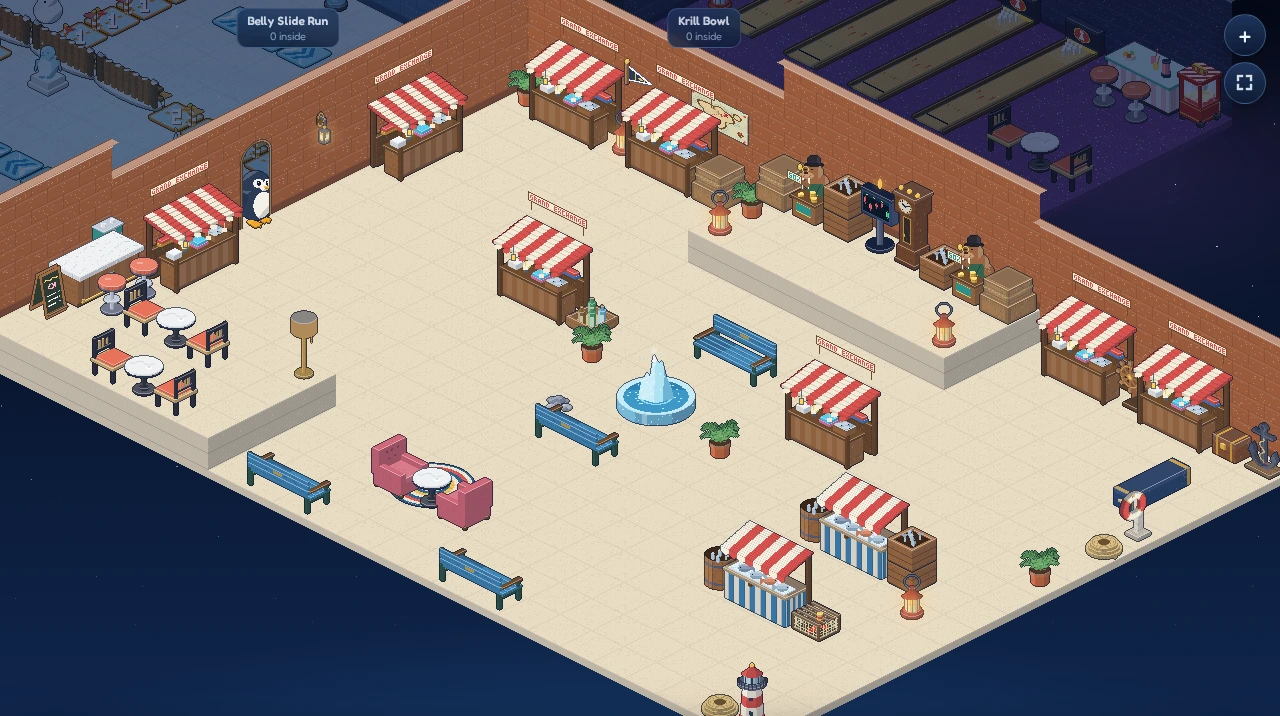
The hall has room for 80 penguins. Market stalls line the back wall and stand round the fountain in the middle, the two walrus dealers keep the raised dais at the back, and there’s a fish market on one side and a raised café terrace on the other for a break between bargains. Every stall shows the same market, so use whichever is nearest.
 Market StallWalrus Dealer
Selling to the walrus dealer
The walruses on the dais at the back of the Grand Exchange buy any Shop furni for half its Shop price (rounded down), paid at once. Gear found on Moon Isle, which the Shop doesn’t sell, fetches a fifth of what it’s worth. No waiting for a buyer, no haggling.
- Click the
 Walrus Dealer and then Sell to the walrus.
 - The Walrus Dealer window lists your furni with the price the walrus pays for each. Click one.
- If you have several of it, set how many with − and + (up to 50 at a time).
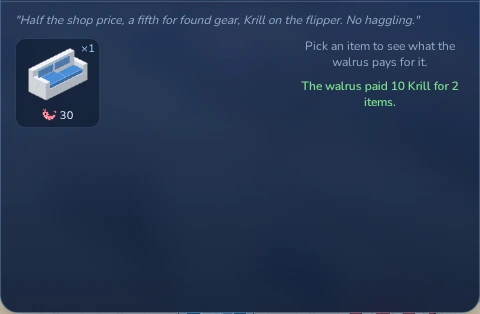
- Click Sell … for. The Krill land in your purse right away, and the window says what the walrus paid, for example The walrus paid 10 Krill for 2 items.
A sale to the walrus can’t be undone. If you’d like more for your furni, sell it at a market stall instead.
The walrus doesn’t buy furni that only creatures drop, nor workshop furni. Furni a creature dropped on Moon Isle, even a piece the Shop sells, isn’t for the walrus: keep it, trade it or sell it at a market stall.
Buying at a market stall
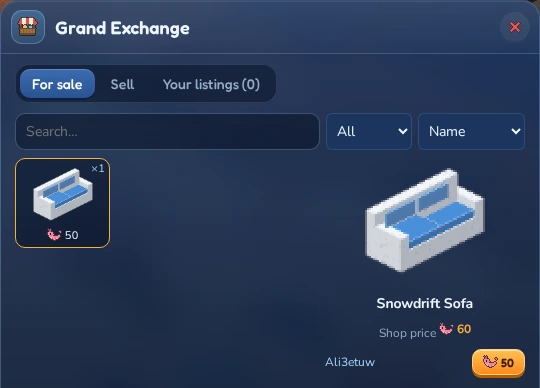
Click any Market Stall and then Browse the market. The Grand Exchange window opens on the For sale tab: every piece of furni other penguins are selling, with the number on offer and the cheapest price.
- Click a piece of furni to see who sells it, cheapest first, and what it costs in the Shop.
- Click the
 price next to a seller to buy from them.
Looking for something in particular? Type part of its name into the Search box, or pick a category such as Seating or Gear. The sort box orders the furni by Name, Cheapest, Priciest, Newest or Most offers; with Priciest or Newest the sellers of a piece are listed that way too. When there’s more than fits, ‹ and › under the list turn the pages.
Gear wears out in the open world, so used gear shows its condition next to the seller’s name: a bar, green when it’s like new and red when it’s nearly worn out, and the condition in percent (or Broken). Trades show the same bar on gear.
The furni goes straight into your inventory and the window confirms the purchase. If somebody else was quicker, you see Too late, that one is gone. Guests can look around the market, but buying and selling need a wallet.
Selling at a market stall
At a stall you set the price yourself. It must be at least 1 Krill and below the Shop price. Furni that only drops from creatures has no Shop price; it can go for up to five times what it’s worth. The market keeps a fee of 10% (rounded down) when your furni sells; the rest is yours.
- Click a Market Stall, then Browse the market, and open the Sell tab.
- Click the furni you want to sell. The price box suggests a price; type your own if you like.
- Got several copies of a piece of gear in different condition? Pick the one to sell: each condition is listed with its bar and percent, the most worn first (and already picked). Buyers see the condition of the one you list. A copy you wear on Moon Isle is marked Worn and comes after the spares: list it and it comes off your penguin.
- Under the price you see what you’ll get, for example You get 45 when it sells (10% market fee), and what the walrus would pay instead.
- Click Put up for sale.
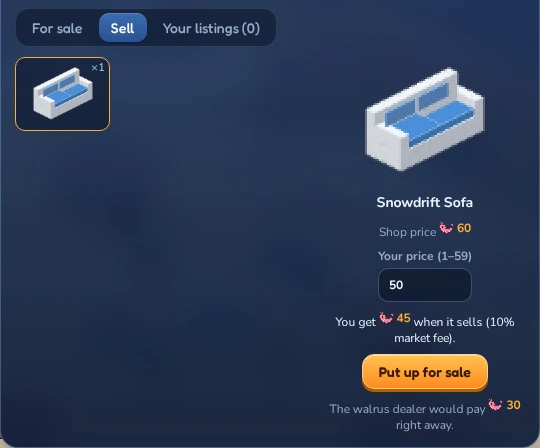
Furni that’s up for sale leaves your inventory until it sells or you take it back, so you can’t place or trade it meanwhile. When it sells, you get the Krill and a message, wherever you are in the inn: (name) bought your Snowdrift Sofa at the Grand Exchange. You got 45 Krill after the market fee.
You can have up to 20 pieces up for sale at once, or 35 while you wear a LUNC Penguin. Furni made at your igloo’s workshop can be listed for up to 2,000 Krill, and gear found on Moon Isle for up to five times what it’s worth, more for the rarest pieces. Selling and buying need a wallet: guests can’t sell to the walrus either. See Keeping a guest penguin.
Your listings
The Your listings tab shows everything you have up for sale, with your price and what you’ll get after the fee. Changed your mind? Click Take back and the furni goes back into your inventory. Taking something back is free.
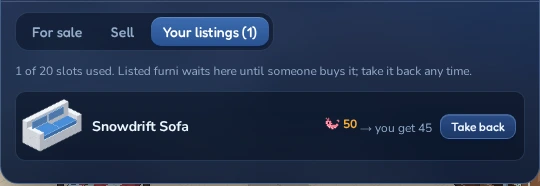
To change a price, take the furni back and put it up again.
The Isle Grand Exchange on Moon Isle
Moon Isle has a Grand Exchange of its own, for what you use and gather on the island: gear, and the resources your igloo harvests. It stands on the east side of the Upper Ring, by the Grand Exchange Line’s cable car station; the  map marks it with two arrows trading places on teal. Walk up to the stall and click Market or Walrus in the box in the top-left corner. Walking away closes the windows again.
- Gear only. The stall and the walrus here deal in gear: weapons, shields, helmets and armour, from the Shop or found on the island. Furni sells at the Grand Exchange in the Inn. Gear put up at either Grand Exchange is for sale at both, and the Your listings tab here shows your gear and your resources.
- The walrus buys gear as in the Inn, half the Shop price or a fifth of what found gear is worth, but never resources.
- Take it off first. Neither the stall nor the walrus here takes a piece you’re wearing: they say Take off your … before you sell it. Spare copies of it don’t count, so you can still sell those.
- Resources (
 wood,
wood,  stone,
  quartz,
  cotton and
  ore) only change paws between penguins, for Krill. The market keeps 10% of each sale, as for furni.
Buying and selling resources
Open the Resources tab of the Isle Grand Exchange window. The tiles show how much of each resource other penguins sell and the cheapest price per unit. Your own lots don’t count there: a resource only you sell reads yours, and the panel on the right lists your lots of it with Take back. Click one to see its lots, cheapest first: who sells it, how many are left and the price for each.
- To buy, type how many you want next to a lot and click its total. You can take part of a lot; the rest stays for sale. The resources go straight into your workshop store.
- To sell, pick the resource, type how many (up to what you have, 1,000 at most) and the price for each (1 to 1,000 Krill), and click Put up for sale. Under the price you see what you get when all of it sells. The resources leave your store until they sell or you take them back under Your listings; when some sell, you get the Krill and a message wherever you are.
You can have up to 20 lots of resources up for sale at once, or 35 while you wear a LUNC Penguin. Like the stalls in the Inn, buying and selling need a wallet.